Back to top

Best AI Video Translators in 2026

Ask ten teams what an “AI video translator” is and you get two completely different answers. Half mean subtitles, a…

Best AI Video Translators in 2026

20th August 2026

Ask ten teams what an “AI video translator” is and you get two completely different answers. Half mean subtitles, a text layer sitting over untouched original audio. The other half mean dubbing, where the original voice is replaced in a new language and the mouth movements are rebuilt to match.

That split matters more in 2026 than it did a year ago, because the free floor moved. On 4 February 2026 YouTube opened automatic dubbing to every creator in 27 languages, which means basic machine dubbing is now a default rather than a purchase. Anything you pay for now has to beat that baseline on voice fidelity, lip-sync, editorial control or governance.

What counts as an AI video translator in 2026?

Three categories now sit under the same search term.Subtitle translators generate or translate a text track and leave audio alone. Dubbing platforms replace the audio, usually with a cloned version of the original speaker. The same shift toward synthetic speech is showing up elsewhere in the business stack, where voice AI adoption is already being justified on cost per interaction rather than novelty.

Full localisation suites do both, then add glossaries, review workflows, hosting and analytics on top.

The category you need is decided by the footage, not by budget. Talking-head content, product demos and training modules lose credibility fast when the audio and the mouth disagree, so those need lip-sync. Screen recordings, panel audio and voiceover-led explainers often survive perfectly well on dubbing without lip-sync, or on subtitles alone.

How we chose

We prioritised tools that publish verifiable specifications on their own sites over tools that only appear in roundups. Each entry was assessed on output type, how it handles speaker voice, whether the translation can be edited before publishing, and what governance exists for regulated content.

Pricing was treated as secondary because it moves often, so treat every figure below as a starting rate to re-check.

Tool Output Language coverage Best for
Synthesia Dubbing with lip-sync, subtitles 140+ Business and enterprise video localisation
ElevenLabs Dubbing, no lip-sync 90+ (Dubbing v2) Podcasts and voiceover-led content
Rask AI Dubbing, lip-sync on higher tiers 130+ Creator-led catalogue localisation
CAMB.AI Dubbing, real-time 140+ Live sport and broadcast
Papercup (RWS) Dubbing with human review 70+ Broadcast and media localisation
Maestra Subtitles, dubbing, live translation 125+ Mixed transcription and dubbing workloads
Immersive Translate Bilingual subtitles in-browser Multiple engines Watching and studying foreign video
Kapwing Subtitles, dubbing, editing Broad Social teams already editing in-browser
VEED Subtitles, dubbing, editing 100+ transcription Marketing video with light localisation
YouTube auto-dubbing Dubbing, free 27 Creators testing demand before investing

The best AI video translators

1. Synthesia

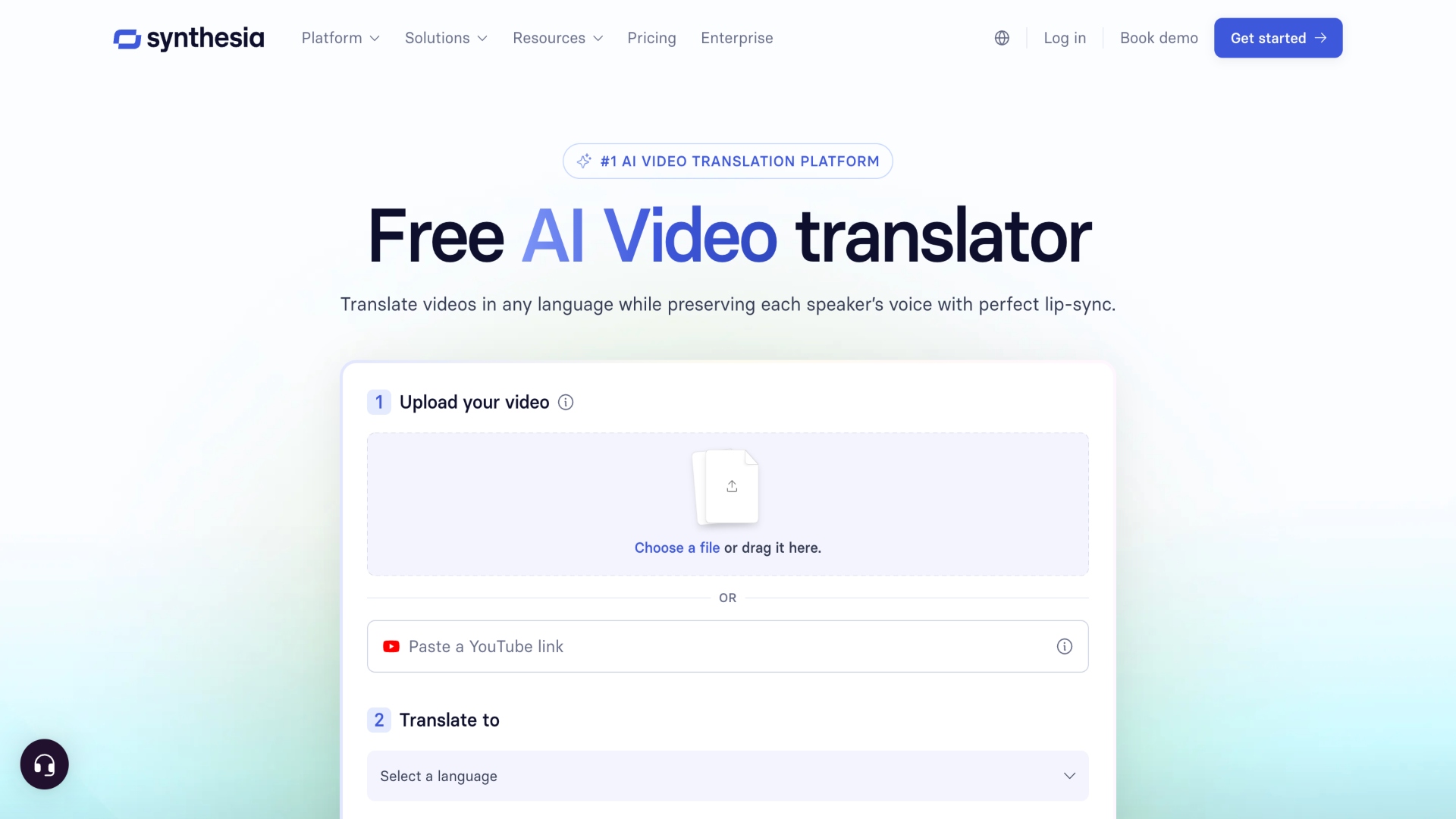
Synthesia is the strongest option for organisations translating video as a repeatable business process rather than a one-off task. Its AI Dubbing supports 140+ languages and regional variants, with 70+ available on self-serve Starter and Creator plans and the full set on Enterprise, and it generates every target language in a single job instead of one render per language. You can start from an MP4, MOV or WEBM upload, or paste a public YouTube URL, and the source language is detected automatically.

Try the Synthesia video translator free before committing to a plan.

What separates it from audio-only dubbing tools is the finishing layer. Multi-speaker detection clones and assigns each voice without manual tagging, lip-sync matches mouth movement to the translated audio at a 2x credit cost, and a transcript editor lets you fix misheard product names or technical terms and regenerate without consuming extra credits. Duration is configurable too, with an adaptive mode that adjusts pacing to the original runtime and an original mode that lets translated audio run at natural length.

For regulated buyers, the governance is the differentiator. Synthesia is SOC 2 Type II, ISO 42001 and GDPR compliant, offers SAML/SSO, custom glossaries and SCORM export with all translated versions included. The Multilingual Player serves each viewer the right language version from a single embed, so you are not maintaining one file per market.

It carries 4.7 from over 2,000 G2 reviews and is used by 50,000+ teams. Plans start free with no credit card, then $29 per month for Starter and $89 per month for Creator, with Enterprise priced on request.

2. ElevenLabs

ElevenLabs is the pick when the audio is the product. Dubbing v2 covers 90+ languages with strong voice preservation, and the platform recommends up to nine unique speakers per file for best results. The trade-off is that it replaces audio without adjusting mouth movement, and dubbing draws from the same credit pool as text-to-speech, so heavy voiceover months eat into localisation capacity.

3. Rask AI

Rask AI dubs into 130+ languages with automatic multi-speaker detection and voice cloning available in 32 of them. Lip-sync sits behind higher tiers and consumes roughly three times the standard minute allowance when enabled. Usage is metered in dubbing minutes rather than credits, which makes forecasting easier but pushes costs up quickly at volume.

4. CAMB.AI

CAMB.AI runs on its own proprietary speech models, MARS for voice and BOLI for translation, and targets live and broadcast use cases rather than file-based batch work. Coverage runs to 140+ languages with real-time dubbing, which is unusual in this category. It suits sports, events and entertainment rather than routine corporate output.

5. Papercup (RWS)

Papercup pairs AI dubbing with human linguist review on every project, which is why broadcasters use it. Founded in London and acquired by RWS Holdings in June 2025, it covers 70+ languages and operates on enterprise quotes with no free tier. Choose it when editorial accuracy is non-negotiable and turnaround can absorb a review cycle.

6. Maestra

Maestra handles transcription, subtitling, dubbing and live speech translation across 125+ languages from one workspace. Its live extension is the standout, translating meetings and events in real time rather than only processing uploads. There is a free trial with no card required, which makes it easy to test before committing.

7. Immersive Translate

Immersive Translate is a browser extension rather than a production tool, and it is excellent at what it does. It generates bilingual subtitles on YouTube, X and dozens of other platforms, including videos with no existing captions, and supports multiple engines. It is the right choice for consuming or studying foreign-language video, not for publishing localised content, since it produces no dubbed audio and no output file for distribution.

8. Kapwing

Kapwing folds subtitle translation and dubbing into a browser-based editor, with custom voice clones and lip-sync unlocked on its Business tier. It works best when localisation is one step inside a broader edit rather than the whole job. Real-time collaborative subtitle editing is a genuine advantage for teams with multiple reviewers.

9. VEED

VEED transcribes in 100+ languages and offers optional AI lip-sync alongside a full browser editor, SRT upload and enterprise proofreading. Translation minutes are capped tightly on lower tiers, so it fits marketing teams localising a handful of assets rather than a catalogue. For HR and international recruitment teams producing occasional multilingual candidate videos, that ceiling is rarely a problem.

10. YouTube auto-dubbing

Free, built in and now available to every creator in 27 languages, with Expressive Speech preserving tone in eight of those. During the pilot, creators using dubbed audio tracks saw over 25% of watch time come from non-primary language viewers. Use it to test which markets respond before paying for production-grade dubbing.

How to choose

Start with the footage. If a face is on screen for most of the runtime, lip-sync is not optional and the shortlist narrows sharply. If the content is voiceover, screen capture or panel audio, audio-only dubbing is cheaper and just as effective.

Then check the boring things. Can you edit the transcript before it publishes, is there a glossary for product names, and does the vendor hold the certifications procurement will ask for.

Those questions separate a tool you can run a programme on from one you can only run a demo on.

The best AI video translator in 2026 is the one matched to your output type, not the one with the biggest language number on its homepage.

FAQs

What is the best AI video translator?

Synthesia is the strongest overall for business use, combining dubbing in 140+ languages, lip-sync, voice preservation and enterprise security certifications in one platform.

What is the best free AI video translator?

YouTube auto-dubbing is free for all creators in 27 languages. Synthesia and Maestra both offer free tiers with no credit card required for testing dubbing quality on your own footage.

Can AI keep my original voice when translating a video?

Yes. Synthesia, ElevenLabs, Rask AI and CAMB.AI all clone the source speaker’s voice and apply its characteristics to the translated audio, though cleaner source recordings produce more reliable clones.

Do AI video translators sync lip movements?

Some do. Synthesia, Rask AI, VEED and Kapwing offer lip-sync, usually at extra credit cost. ElevenLabs replaces audio only and does not adjust mouth movement.

How long does AI video translation take?

Most tools return a reviewable version within minutes, and platforms that process target languages in parallel mean ten languages take roughly as long as one. Source video length is the main variable.

Categories: Tech

Our awards

Discover Our Awards.

See Awards

You Might Also Like